Publii: The Desktop App That Makes Static Blogging Actually Easy
Publii: The Desktop App That Makes Static Blogging Actually Easy
There’s something satisfying about desktop software. Maybe it’s the control—you’re not at the mercy of a browser tab or an internet connection. Maybe it’s the permanence—your work is saved locally, right there on your machine. Or maybe it’s just that desktop apps feel more “real” than yet another web interface.
When I first discovered Publii, that’s what struck me. It’s a desktop application for building blogs and static sites, and it brings back that desktop software feeling while giving you all the benefits of modern static site generation. No WordPress hosting bills, no security nightmares, no database maintenance—just a clean interface where you write and publish.
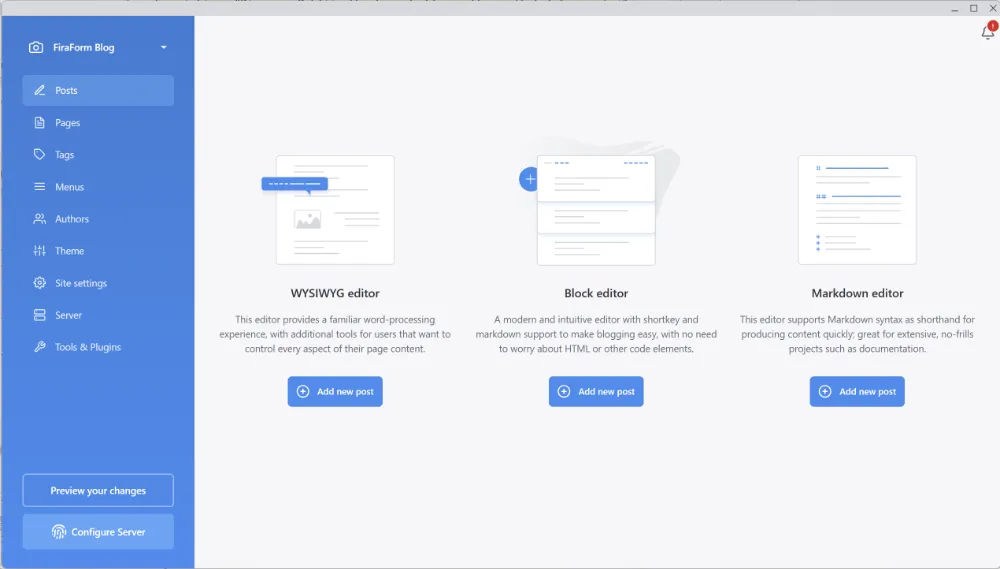
What is Publii?
Publii is a free, open-source desktop application (available for Windows, Mac, and Linux) that lets you create and manage static websites and blogs. Think of it as a WYSIWYG editor meets static site generator. You get the familiar content management experience—similar to WordPress—but instead of running on a server with a database, Publii generates clean HTML files that you can host anywhere.
The best part? You work completely offline. Write your posts, manage your content, customize your design—all without an internet connection. When you’re ready to publish, Publii generates your static site and syncs it to your hosting platform of choice.
Publii gives you two types of content, just like WordPress:
- Posts - For your blog articles, dated content that appears in your RSS feed
- Pages - For static pages like About, Contact, Services, etc.
No coding required, but if you’re a developer, there’s plenty of room for customization.
Why Publii Makes Sense
Let me tell you why this approach is brilliant.
No Server Required - Publii generates static HTML files. This means you can host your site on Cloudflare Pages, Netlify, GitHub Pages, AWS S3, or even traditional hosting via FTP. Most of these options are completely free for small to medium sites.
Offline-First - Write and manage your content without an internet connection. Your entire site lives on your computer. Internet goes down? Keep working. Traveling with spotty WiFi? No problem.
WordPress Familiarity - If you’ve used WordPress, Publii’s interface will feel familiar. Posts, pages, themes, settings—it’s all organized in a way that makes sense. But without the bloat, the plugin conflicts, or the constant security updates.
Security & Performance - You get all the benefits of static sites: no database to compromise, no PHP vulnerabilities to patch, files served directly from a CDN for blazing-fast load times. Your blog loads in milliseconds, not seconds.
Zero Cost Hosting - Seriously, most static site hosts are free. Cloudflare Pages, Netlify, GitHub Pages—they all offer generous free tiers that are more than enough for most blogs. Compare that to $10-30/month for WordPress hosting.
Key Features That Stand Out
Let me walk you through what makes Publii special:
Theme Marketplace - Publii has a growing marketplace with both free and premium themes. Browse professional designs, install them with one click, and customize them to match your brand.
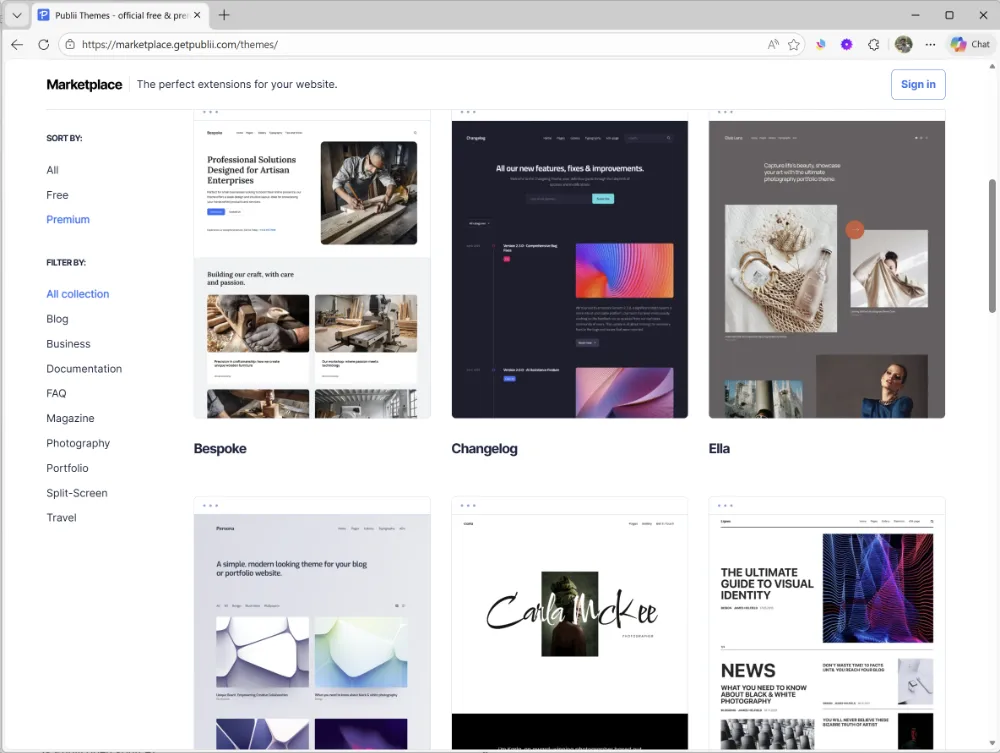
Full Design Control - Not satisfied with existing themes? You have options:
- Customize existing themes with your own CSS and JavaScript
- Create your own custom theme from scratch
- Uses Handlebars templating (similar to WordPress theme structure)
- With AI tools like GitHub Copilot, theme creation is more accessible than ever—even if you’re not a seasoned developer
SEO-Friendly Out of the Box - Publii generates clean, semantic HTML with proper meta tags, Open Graph support, and automatic sitemap generation. Your site is optimized for search engines from day one.
Multiple Site Management - Manage multiple websites from one application. Perfect if you’re running several blogs or client sites.
Image Optimization - Publii automatically optimizes and generates responsive images. Upload a large photo, and Publii creates multiple sizes for different screen resolutions.
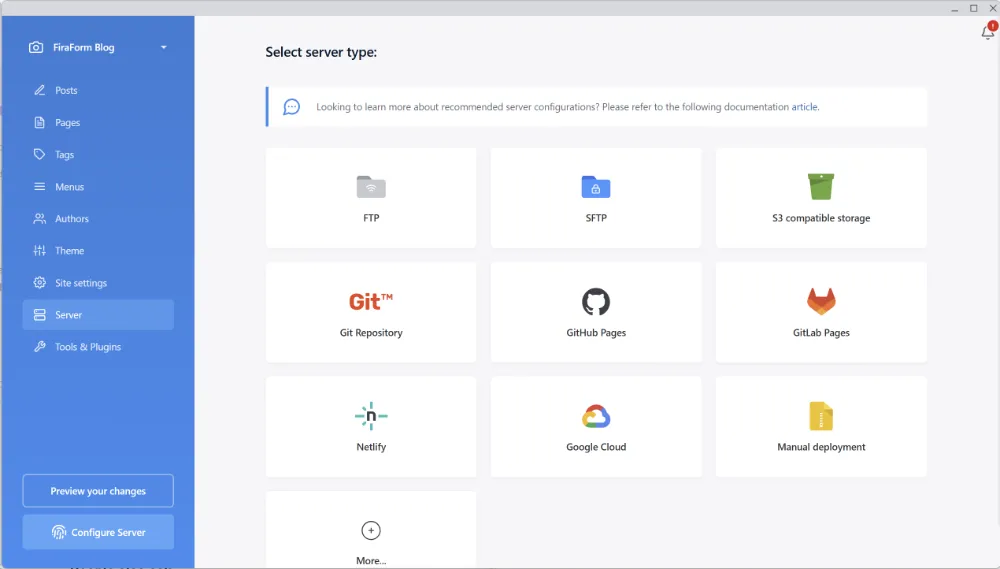
Flexible Deployment Options:
- Built-in FTP/SFTP deployment
- Git-based deployment (GitHub Pages, GitLab Pages)
- One-click deployment to Netlify, GitHub Pages, and more
- Manual export for custom hosting solutions
Built-in Features:
- RSS feed generation (automatically updated with each new post)
- Syntax highlighting for code blocks
- Google Fonts integration
- Custom HTML/CSS/JavaScript injection
- Author management for multi-author blogs
- Tag and category organization
Who Should Use Publii?
Publii isn’t for everyone, but it’s perfect for:
Bloggers Who Want Simplicity - You want to write, not wrestle with WordPress updates and plugin conflicts. Publii gives you a clean writing environment without the maintenance headaches.
Small Business Owners - Need a fast, secure website without ongoing hosting costs? Publii delivers professional results without the technical complexity.
Writers Who Prefer Desktop Tools - If you like the feeling of “real” software over browser-based editors, Publii is your jam. It feels substantial in a way that web interfaces don’t.
Former WordPress Users Switching to Static - You know what WordPress can do, but you’re tired of the baggage. Publii gives you the familiar content management experience without the server-side complexity.
Anyone Who Wants to Own Their Content - Your content lives on your computer, in your control. Export your entire site anytime. No vendor lock-in, no subscription dependencies.
Real-World Workflow
Here’s what it actually looks like to use Publii:
1. Install Publii and Create Your First Site - Download from getpublii.com, install, and create a new site. Takes about 5 minutes.
2. Choose a Theme - Pick from the built-in themes, browse the marketplace for free or premium options, or customize an existing theme. If you’re feeling adventurous, create your own custom theme using Handlebars.
3. Write Your First Blog Post - Click “Posts,” create a new post, and start writing. The editor is clean and distraction-free. Add images, format your text, set your SEO meta data.
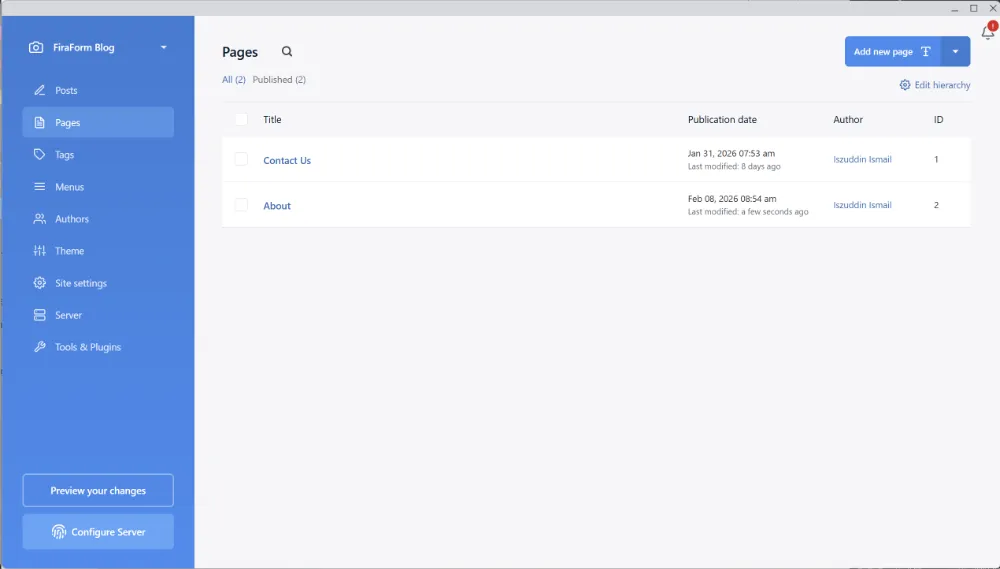
4. Create Essential Pages - Switch to “Pages” and create your About page, Contact page, Services page—whatever your site needs. Pages work just like posts but don’t appear in your blog feed.
5. Preview Locally - Hit the preview button and see exactly how your site will look. No surprises when you publish.
6. Configure Deployment - Choose your hosting platform (Cloudflare Pages, Netlify, GitHub Pages, FTP, etc.) and enter your connection details. Do this once, and you’re set.
7. Hit “Sync” and You’re Live - Click the sync button, and Publii generates your entire site and uploads it to your hosting platform. No build process, no terminal commands, no configuration files.
That’s it. You’re live with a fast, secure, professional-looking blog.
The Static Site Advantage
Let me remind you why static sites are worth considering:
Lightning-Fast Performance - Your HTML files are served directly from a CDN, often from a server geographically close to your visitor. Load times under 500ms are normal.
Unbeatable Security - There’s no backend to hack. No database to compromise. No PHP vulnerabilities to patch. You’re serving HTML files—that’s it.
Free or Cheap Hosting - Cloudflare Pages, Netlify, GitHub Pages—most offer generous free tiers. Even paid options are typically $5-20/month with way more resources than you’ll ever need.
Zero Maintenance - No WordPress updates. No plugin updates. No security patches. Your site just works, year after year.
How It Compares
Let’s be honest about where Publii fits in the ecosystem:
vs. WordPress - Similar ease of use, but no hosting costs, no maintenance burden, and significantly better performance. WordPress still wins for complex sites with lots of dynamic features, but for blogs and marketing sites, Publii is the simpler choice.
vs. Static Site Generators (Hugo, Jekyll, Astro) - No coding required, GUI-based, easier for non-developers. If you’re comfortable with the command line and writing in markdown, generators give you more control. If you want a desktop app that just works, Publii is the winner.
vs. Ghost - Ghost is beautiful and powerful, but it costs $11-200/month for hosting. Publii is free, and you can host your static site free on multiple platforms.
vs. Medium/Substack - With Publii, you own your platform, your URLs, your design, and your data. No algorithm deciding who sees your content. No subscription fees. Complete design control.
Potential Downsides (Being Honest)
Nothing’s perfect, so let’s talk about the trade-offs:
Desktop-Only - You can’t edit from your phone or tablet. Your workflow is tied to your desktop or laptop. If you need mobile editing, this isn’t the solution.
Less Plugin Ecosystem Than WordPress - WordPress has 60,000+ plugins. Publii doesn’t have that ecosystem. You get the built-in features, and you can add custom code, but there’s no massive marketplace of ready-made solutions.
Limited to Blogging/Simple Sites - Publii is great for blogs, portfolios, and marketing sites. It’s not for complex web applications, e-commerce platforms, or sites with heavy user interaction.
Theme Selection - While growing, the theme marketplace is smaller than WordPress. You’ll find good options, but not the overwhelming choice WordPress offers.
Collaboration Challenges - Because Publii is desktop software with local storage, team collaboration is more difficult than with cloud-based CMSs. If multiple people need to edit the site, you’ll need workarounds. Publii recommends using Dropbox or similar cloud storage to sync the site folder across multiple computers. It works, but it’s not as seamless as a web-based CMS where multiple users can log in and edit simultaneously.
For most blogs and small business sites, these limitations don’t matter. But it’s good to know what you’re signing up for.
Forms on Static Sites (The FiraForm Connection)
Here’s the classic static site challenge: you don’t have a backend, so how do you handle forms?
This is where our own solution comes in. Static sites are fantastic, but they lack server-side features like form processing. That’s a problem when you need a contact form, newsletter signup, or customer inquiry form.
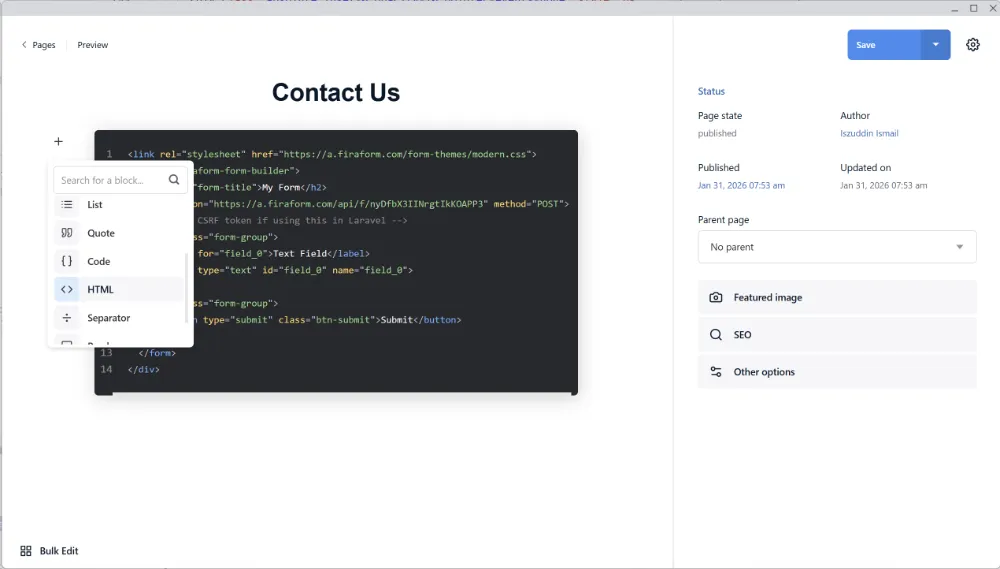
Publii’s Pages feature makes this incredibly easy. When you create a Page (like a Contact page), you can add HTML block elements. This is where FiraForm fits perfectly:
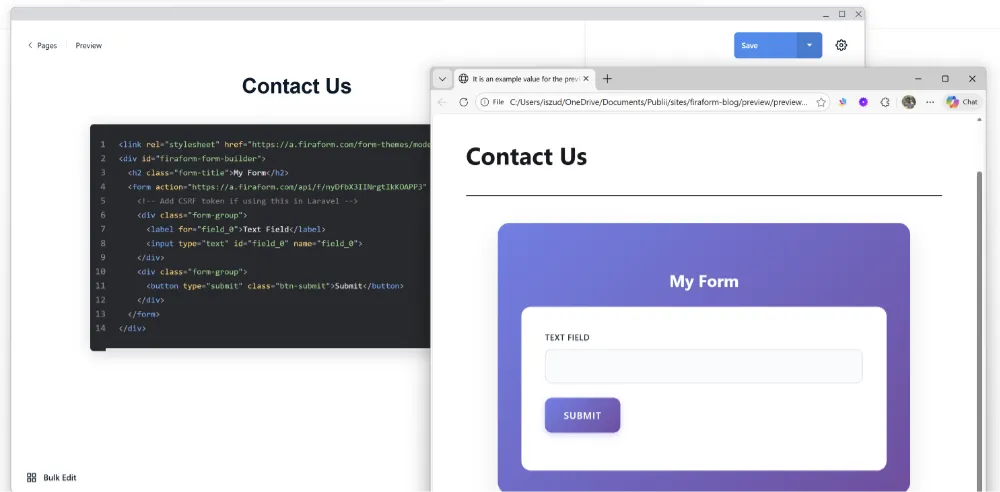
Here’s the workflow:
- Use FiraForm’s Free HTML Form Builder to visually design your form—no coding required
- Copy the generated HTML code
- In Publii, create a new Page (like “Contact”)
- Add an HTML block element to your page
- Paste the FiraForm HTML into the HTML block
- Publish your site
That’s it. You now have a fully functional form on your static site. When someone submits the form, it goes to FiraForm’s backend, and you receive the submission via email or webhook. You keep all the benefits of a static site (speed, security, free hosting) while adding the interactive features you need.
No coding required on your end—FiraForm’s visual form builder generates the HTML, and Publii’s HTML blocks make it easy to drop in.
Need Forms For Your Static Site?
FiraForm is the headless form backend built specifically for static sites. No backend code needed—just point your forms to our endpoint and we'll handle submissions, validation, notifications, and more.
Free tier available • No credit card required
Getting Started
Ready to try Publii? Here’s your game plan:
1. Download Publii - Head to getpublii.com and download the app for your operating system (Windows, Mac, or Linux).
2. Quick Setup - Install the app, create your first site, choose a theme. This takes about 5 minutes.
3. Create Your Content - Write a few blog posts, create your essential pages (About, Contact, etc.).
4. Deploy - Choose your hosting platform. I recommend Cloudflare Pages or Netlify for their free tiers and excellent performance. Configure the connection in Publii’s settings.
5. Add Forms - If you need contact forms or newsletter signups, grab the HTML from FiraForm’s form builder and add it to your Publii pages using HTML blocks.
6. You’re Live - Hit sync, and you have a fast, secure, professional blog running on a static site infrastructure.
Total time from download to live site? Maybe an hour if you’re taking your time.
Conclusion
Publii bridges the gap between simplicity and power. It gives you WordPress-style content management without WordPress complexity. It gives you static site performance without developer tools and terminal commands.
The desktop approach feels right—your content is on your machine, your workflow isn’t dependent on a browser tab, and you have complete control over your site. For bloggers who want to write without the technical overhead, Publii is an excellent choice.
And when you need forms, comments, or other interactive features, services like FiraForm fill the gaps while keeping your site static, fast, and secure.
It’s another win in the growing static site ecosystem. Whether you’re leaving WordPress, starting a new blog, or just exploring options, Publii is worth your time.
Now go download it and see what you think. And if you build something cool, we’d love to hear about it.