Static Site Forms with Cloudflare Pages
A static site has no backend. That’s the whole point—plain HTML, CSS, and JavaScript files served from a CDN. But what happens when you need a form? You still need to collect submissions, store them somewhere, and show them to visitors. That’s where Cloudflare Pages Functions come in: tiny serverless functions that run at the edge, triggered by HTTP requests, without you ever managing a server.
This article walks through a complete, tested pattern: a native HTML form that POSTs to a Pages Function, stores data in D1 (Cloudflare’s serverless SQL database), forwards the original submission to FiraForm for admin handling, and redirects to a public entry wall. The form stays static. The logic stays minimal. And the public API only exposes what you choose to share.
Why Static Sites Need Serverless Logic
Here’s the gap most developers hit: an HTML form with method="POST" and action="/api/submit" will happily send data to a URL. But a static site has no server listening at /api/submit. The request goes nowhere.
You could solve this by pointing the form at an external service (FiraForm, Formspree, etc.), and that works fine for simple contact forms. But what if you also need to:
- Store a public-safe subset of the data in your own database
- Show entries on your own site without depending on an external widget
- Control the response flow (redirect to your own page after submission)
That’s where Pages Functions fit. A single JavaScript file in functions/api/submit.js becomes an endpoint at /api/submit. It can read the request, write to D1, forward data elsewhere, and redirect—all in one function call.
The key insight: the form is static, the handling is serverless, and you control the privacy boundary.
When You Do Not Need a Pages Function
Not every FiraForm integration needs D1 or serverless code. If your only goal is to collect form submissions and view them in a dashboard, the simplest approach is a direct FiraForm endpoint—zero custom backend required.
<form method="POST"
      action="https://a.firaform.com/api/f/YOUR_FORM_ID">
  <input type="text" name="name" required placeholder="Jane Doe">
  <input type="email" name="email" required placeholder="[email protected]">
  <textarea name="message" required placeholder="Your message"></textarea>
  <button type="submit">Send</button>
</form>
That’s it. The form POSTs directly to FiraForm’s API endpoint. Submissions appear after FiraForm accepts the request. You can configure a success redirect to a thank-you page on your static site. No Functions, no database, no serverless code.
This works when you need:
- Private form submissions that only you see in the dashboard
- A simple thank-you redirect after submission
- No custom server code at all
Here’s a quick guide to choosing the right pattern:
| Need | Best pattern |
|---|---|
| Private form submissions and a thank-you redirect | Direct FiraForm endpoint |
| No custom server code | Direct FiraForm endpoint |
| Public, anonymised entry wall | Pages Function + D1 |
| Custom redirect/control or data projection | Pages Function + D1 |
| Full submission management | FiraForm dashboard (works with either direct endpoint or gateway forwarding) |
The giveaway demo in this article uses FiraForm’s normal submission endpoint for the full submission (name, email, Instagram handle, consent). It does not require FiraForm’s outbound webhook integration—the Pages Function gateway exists solely because the demo needs a separate, public-safe list of entries rendered on its own domain.
If you just need a contact form, a feedback widget, or any form where submissions stay private, skip the Function. Point your form at FiraForm’s endpoint and let the dashboard handle the rest.
The Architecture
The tested flow looks like this:
Browser → POST /api/submit → Pages Function → D1 + FiraForm → 302 /entries.html
Browser → GET /api/submissions → Pages Function → D1
Two pages, two API endpoints, one database:
| Component | Role |
|---|---|
index.html | Entry form, native HTML POST to /api/submit |
entries.html | Public entry wall, fetches /api/submissions |
functions/api/submit.js | Receives form, stores in D1, forwards to FiraForm, redirects |
functions/api/submissions.js | Returns latest 50 public-safe entries from D1 |
D1 entries table | Stores only: masked display name, prize choice, timestamp |
The privacy boundary is the important design decision here. The full submission (name, email, Instagram handle, consent) goes to FiraForm for admin processing and email notifications. D1 retains only a public-safe projection: a masked name like "A**** R****", the selected prize, and the submission timestamp. Email, Instagram handle, IP, user-agent, and raw payload never touch D1 and never appear in the public API.
Project Structure
firaform-giveaway-demo/
├── index.html
├── entries.html
├── functions/
│   └── api/
│       ├── submit.js
│       └── submissions.js
├── migrations/
│   └── 0001_initial_schema.sql
└── wrangler.toml
No build step, no node_modules, no framework. Just HTML files and JavaScript functions.
The Static Form
The form in index.html is standard HTML. No JavaScript required for submission:
<form id="giveaway-form" method="POST" action="/api/submit">
  <div class="field">
    <label for="name">Full Name</label>
    <input type="text" id="name" name="name" required
           autocomplete="name" placeholder="Jane Doe">
  </div>

  <div class="field">
    <label for="email">Email Address</label>
    <input type="email" id="email" name="email" required
           autocomplete="email" placeholder="[email protected]">
  </div>

  <div class="field">
    <label for="instagram_handle">Instagram Handle</label>
    <input type="text" id="instagram_handle" name="instagram_handle"
           required autocomplete="off" placeholder="@janedoe">
  </div>

  <div class="field">
    <label for="prize_choice">Choose Your Prize</label>
    <select id="prize_choice" name="prize_choice" required>
      <option value="" disabled selected>Select a prize</option>
      <option value="voucher_50">RM 50 Voucher</option>
      <option value="voucher_100">RM 100 Voucher</option>
      <option value="merch_bundle">Merch Bundle</option>
    </select>
  </div>

  <div class="field">
    <div class="checkbox-row">
      <input type="checkbox" id="consent" name="consent" required>
      <label for="consent">I agree to the giveaway terms and
        consent to my data being used for this giveaway only.</label>
    </div>
  </div>

  <button type="submit">Enter Giveaway</button>
</form>
The action="/api/submit" points to our Pages Function. When the browser submits this form, it sends a POST request with Content-Type: application/x-www-form-urlencoded to our Function. No fetch, no XMLHttpRequest, no client-side framework needed.

A native HTML form posts directly to /api/submit.
The Pages Function Gateway
The core of the pattern is functions/api/submit.js. This single function handles everything: parsing the request, validating fields, storing in D1, forwarding to FiraForm, and redirecting the user.
Parsing and validation
Pages Functions receive the request on context.request. The function detects the content type and parses accordingly:
const contentType = request.headers.get('content-type') || '';
let name, email, instagramHandle, prizeChoice;

if (contentType.includes('application/json')) {
  const body = await request.json();
  name = body.name;
  email = body.email;
  instagramHandle = body.instagram_handle;
  prizeChoice = body.prize_choice;
} else {
  const form = await request.formData();
  name = form.get('name');
  email = form.get('email');
  instagramHandle = form.get('instagram_handle');
  prizeChoice = form.get('prize_choice');
}

if (!name || !email || !prizeChoice) {
  return new Response('Missing required fields', { status: 400 });
}
This supports both application/x-www-form-urlencoded (native HTML form) and application/json (AJAX). The validation rejects incomplete payloads early.
Name masking
Before storing anything, the function masks the submitter’s name for public display:
function maskName(fullName) {
  const parts = fullName.trim().split(/\s+/);
  if (parts.length === 1) {
    const first = parts[0];
    return first.charAt(0) + '*'.repeat(Math.max(0, first.length - 1));
  }
  const first = parts[0];
  const last = parts[parts.length - 1];
  const maskedFirst = first.charAt(0) + '*'.repeat(Math.max(0, first.length - 1));
  const maskedLast = last.charAt(0) + '*'.repeat(Math.max(0, last.length - 1));
  return maskedFirst + ' ' + maskedLast;
}
"Ahmad Razak" becomes "A**** R****". The full name is only sent to FiraForm—it’s never stored in D1.
D1 insert
Each submission gets a UUID and is stored with that value as its primary key:
const submissionId = crypto.randomUUID();
const submittedAt = new Date().toISOString();
const displayName = maskName(name);

await env.GIVEAWAY_DB.prepare(
  'INSERT OR IGNORE INTO entries (submission_id, display_name, prize_choice, submitted_at) VALUES (?, ?, ?, ?)'
).bind(submissionId, displayName, prizeChoice, submittedAt).run();
INSERT OR IGNORE prevents the same submission ID from being written twice. This demo intentionally does not deduplicate repeat form submissions: a browser retry creates a new UUID and a new entry.
GIVEAWAY_DB is the D1 binding name, configured in wrangler.toml and accessible on context.env.
FiraForm forwarding
After storing in D1, the function forwards the original submission data to FiraForm:
try {
  await fetch('https://a.firaform.com/api/f/' + env.FORM_ID, {
    method: 'POST',
    headers: {
      'Content-Type': 'application/json',
      'Origin': 'https://firaform-giveaway-demo.pages.dev'
    },
    body: JSON.stringify({
      name: name,
      email: email,
      instagram_handle: instagramHandle,
      prize_choice: prizeChoice,
      consent: 'on'
    })
  });
} catch (err) {
  // FiraForm forward failed — entry is already in D1, continue
}
This is best-effort. The Function waits for the forwarding request, but a network failure is ignored and non-success HTTP responses are not inspected. The entry is already safely stored in D1 before forwarding begins.
Two things to note:
- The
Originheader identifies the configured Pages domain for FiraForm’s domain validation in this server-side request. env.FORM_IDis a Cloudflare Pages secret containing the FiraForm form UUID.
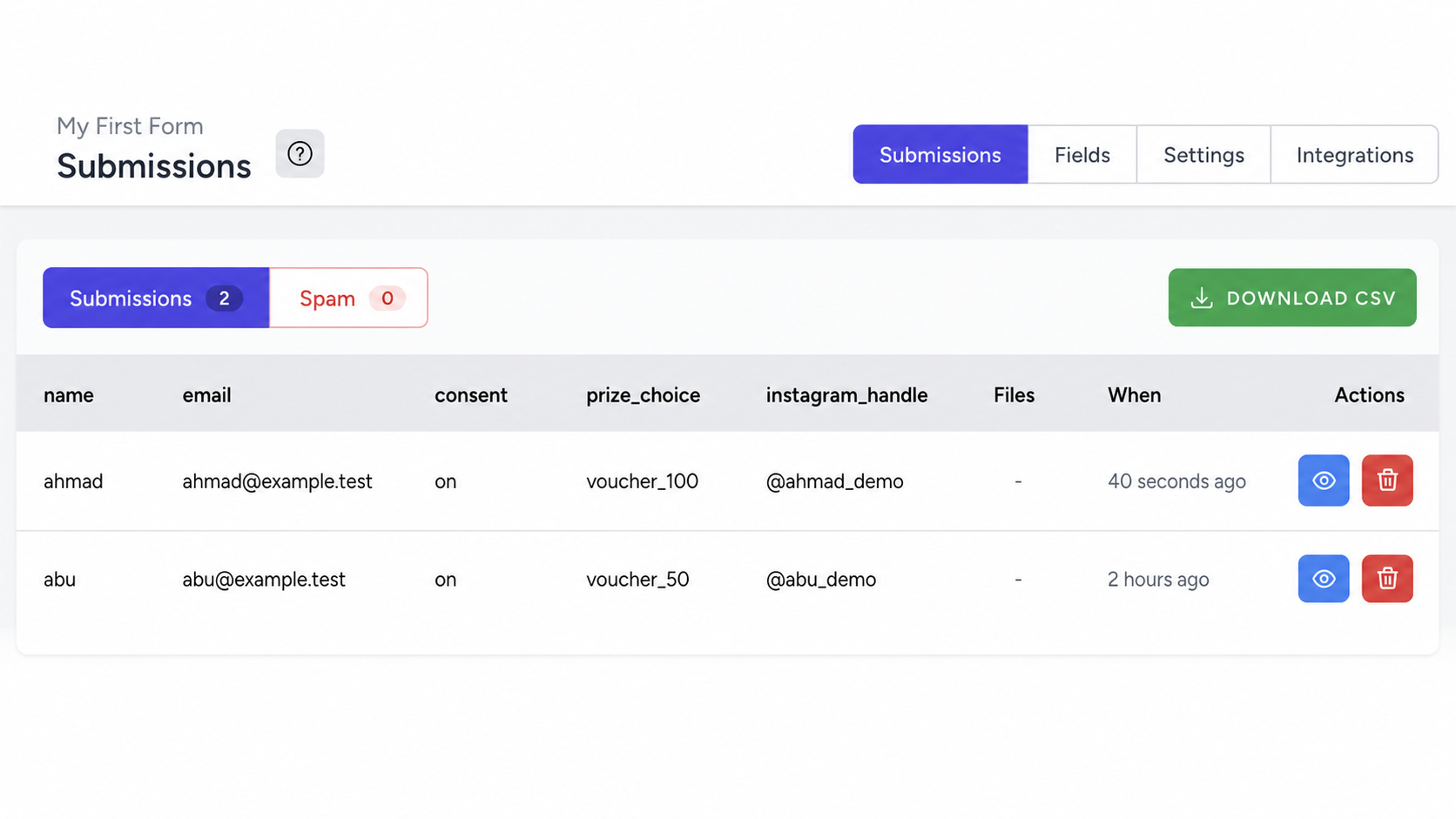
FiraForm receives the original fields for private admin handling; the public entry wall never exposes them.
Redirect
After both writes, the user gets redirected to the entry wall:
return Response.redirect(
  new URL('/entries.html?submitted=1', request.url), 302
);
The ?submitted=1 parameter triggers a confirmation banner and polling on the entries page.
D1 Schema and Binding
Migration
The D1 table is intentionally minimal:
CREATE TABLE IF NOT EXISTS entries (
  submission_id TEXT PRIMARY KEY,
  display_name  TEXT NOT NULL,
  prize_choice  TEXT NOT NULL,
  submitted_at  TEXT NOT NULL
);
Four columns, no email, no Instagram handle, no IP, no user-agent. This is the privacy boundary enforced at the database level. Even if the code changes, the schema doesn’t expose sensitive fields.
Apply the migration:
npx wrangler d1 migrations apply giveaway-db --remotewrangler.toml binding
d1_databases = [
  { binding = "GIVEAWAY_DB", database_name = "giveaway-db",
    database_id = "YOUR_DATABASE_ID" }
]
The binding name (GIVEAWAY_DB) is what your Function accesses via context.env.GIVEAWAY_DB. You can also configure this binding through the Cloudflare dashboard under Settings > Bindings—see the Cloudflare Pages bindings documentation for details.
Secrets
Two secrets are set via the dashboard or CLI:
echo "your-form-uuid" | npx wrangler pages secret put FORM_ID \
  --project-name=firaform-giveaway-demo
FORM_ID is the FiraForm form UUID used in the forwarding fetch. WEBHOOK_SECRET is used by an optional webhook endpoint (not part of the active demo flow).
The Public Entry Wall
The entries page (entries.html) is a static HTML page that fetches and renders entries client-side.
Fetching entries
async function loadEntries() {
  try {
    var res = await fetch('/api/submissions');
    if (!res.ok) throw new Error('HTTP ' + res.status);
    var data = await res.json();
    renderEntries(data.entries || []);
  } catch (err) {
    renderError('Failed to load entries. Please try again later.');
  }
}
Post-submit confirmation
When the page loads with ?submitted=1, it shows a confirmation banner and polls for the new entry:
if (justSubmitted) {
  showBanner('Your entry has been submitted! It may take a moment to appear.', false);
  var pollCount = 0;
  var pollInterval = setInterval(function () {
    loadEntries();
    pollCount++;
    if (pollCount >= 5) clearInterval(pollInterval);
  }, 2000);
} else {
  loadEntries();
}
The page polls every 2 seconds, up to 5 times, to refresh the entry wall after the redirect and keep the confirmation state visible. A manual Refresh button is always available as a fallback.
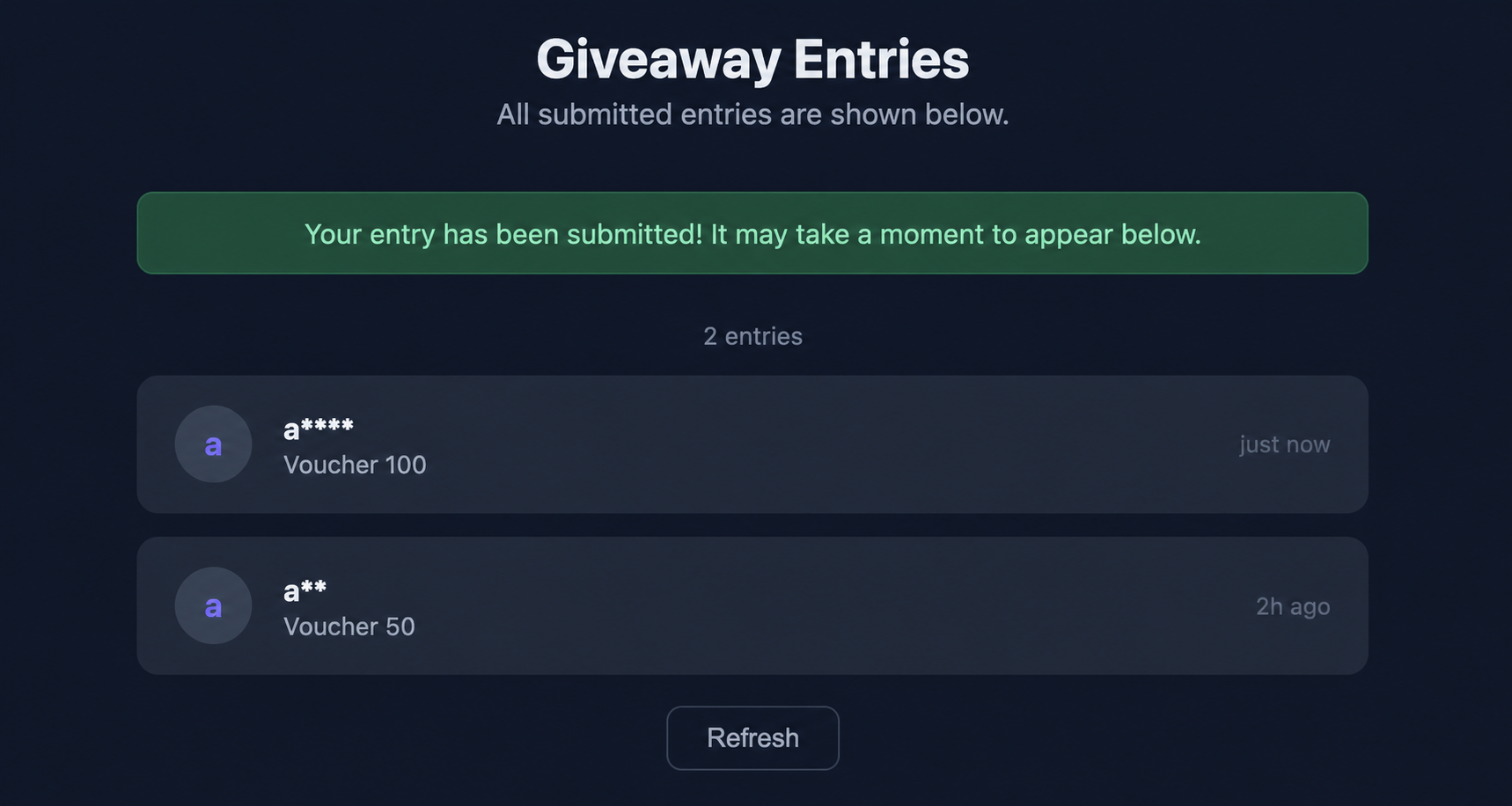
The public page exposes only the fields chosen for public display.
Rendering the list
Each entry renders with an avatar initial, masked name, formatted prize, and relative timestamp:
function renderEntries(entries) {
  if (!entries || entries.length === 0) {
    content.innerHTML = '<div class="empty">No entries yet. Be the first to enter!</div>';
    return;
  }
  content.innerHTML = '<div class="list">' + entries.map(function (e) {
    var initial = e.display_name ? e.display_name.charAt(0) : '?';
    var prize = e.prize_choice
      ? e.prize_choice.replace(/_/g, ' ')
          .replace(/\b\w/g, function (c) { return c.toUpperCase(); })
      : '';
    return '<div class="entry">' +
      '<div class="avatar">' + escHtml(initial) + '</div>' +
      '<div class="entry-info">' +
        '<div class="entry-name">' + escHtml(e.display_name) + '</div>' +
        '<div class="entry-prize">' + escHtml(prize) + '</div>' +
      '</div>' +
    '</div>';
  }).join('') + '</div>';
}
The Submissions API
The API that powers the entry wall is a single Pages Function:
export async function onRequestGet(context) {
  const { env } = context;

  try {
    const { results } = await env.GIVEAWAY_DB.prepare(
      'SELECT display_name, prize_choice, submitted_at ' +
      'FROM entries ORDER BY submitted_at DESC LIMIT 50'
    ).all();

    return Response.json({ entries: results });
  } catch (err) {
    return new Response('Database error', { status: 500 });
  }
}
This is the privacy boundary enforced at the API level. The query selects only display_name, prize_choice, and submitted_at. Email, Instagram handle, IP, user-agent, and raw payload are not in the table and cannot leak through this endpoint. The LIMIT 50 keeps response sizes reasonable.
Limitations
Be aware of these constraints with this pattern:
- FiraForm forwarding is best-effort. If FiraForm is down or the
Originheader is misconfigured, the entry is still stored in D1 but won’t appear in FiraForm’s dashboard. There’s no retry logic. - Repeated submissions create separate entries. Each form submit generates a new UUID. There’s no deduplication by email or name—by design, since D1 doesn’t store email.
- No webhook endpoint in the active flow. The project includes a
/api/webhookFunction for receiving FiraForm’s outbound webhooks, but it’s not part of the active demo flow. - D1 limits. Check the current Cloudflare D1 pricing and limits before using this pattern for high-traffic forms.
Deployment Checklist
-
Create the D1 database:
npx wrangler d1 create giveaway-dbCopy the
database_idintowrangler.toml. -
Apply the migration:
npx wrangler d1 migrations apply giveaway-db --remote -
Deploy to Cloudflare Pages:
npx wrangler pages deploy . --project-name=firaform-giveaway-demo -
Set the
FORM_IDsecret in the Cloudflare dashboard (Settings > Variables and Secrets > Add > Encrypt). -
Configure FiraForm to allow your Pages domain as an allowed origin.
The Bottom Line
Static sites don’t need a traditional backend to handle forms. Cloudflare Pages Functions give you a serverless endpoint at /api/submit that can parse requests, write to D1, forward to external services, and redirect—all without a server to manage. The privacy boundary is deliberate: full data goes to FiraForm for admin use, while D1 holds only what you want to display publicly.
If you’re building a landing page, a giveaway, a contact form, or any static site that needs to collect data, this pattern gives you the simplicity of static hosting with the flexibility of serverless logic.
Need Forms For Your Static Site?
FiraForm is the headless form backend built specifically for static sites. No backend code needed—just point your forms to our endpoint and we'll handle submissions, validation, notifications, and more.
Free tier available • No credit card required